How to Segment Your Shopify Email List for Black Friday
A customer buys a coffee tasting box at 9:12 on the Saturday after Black Friday. At 11:00, the same store emails her: "Still thinking about it?"
She isn't. She bought it 2 hours ago.
The store's Black Friday calendar probably looked great. Early access, launch, reminder, last call, all colour-coded. The calendar was organised. Her inbox told a very different story.
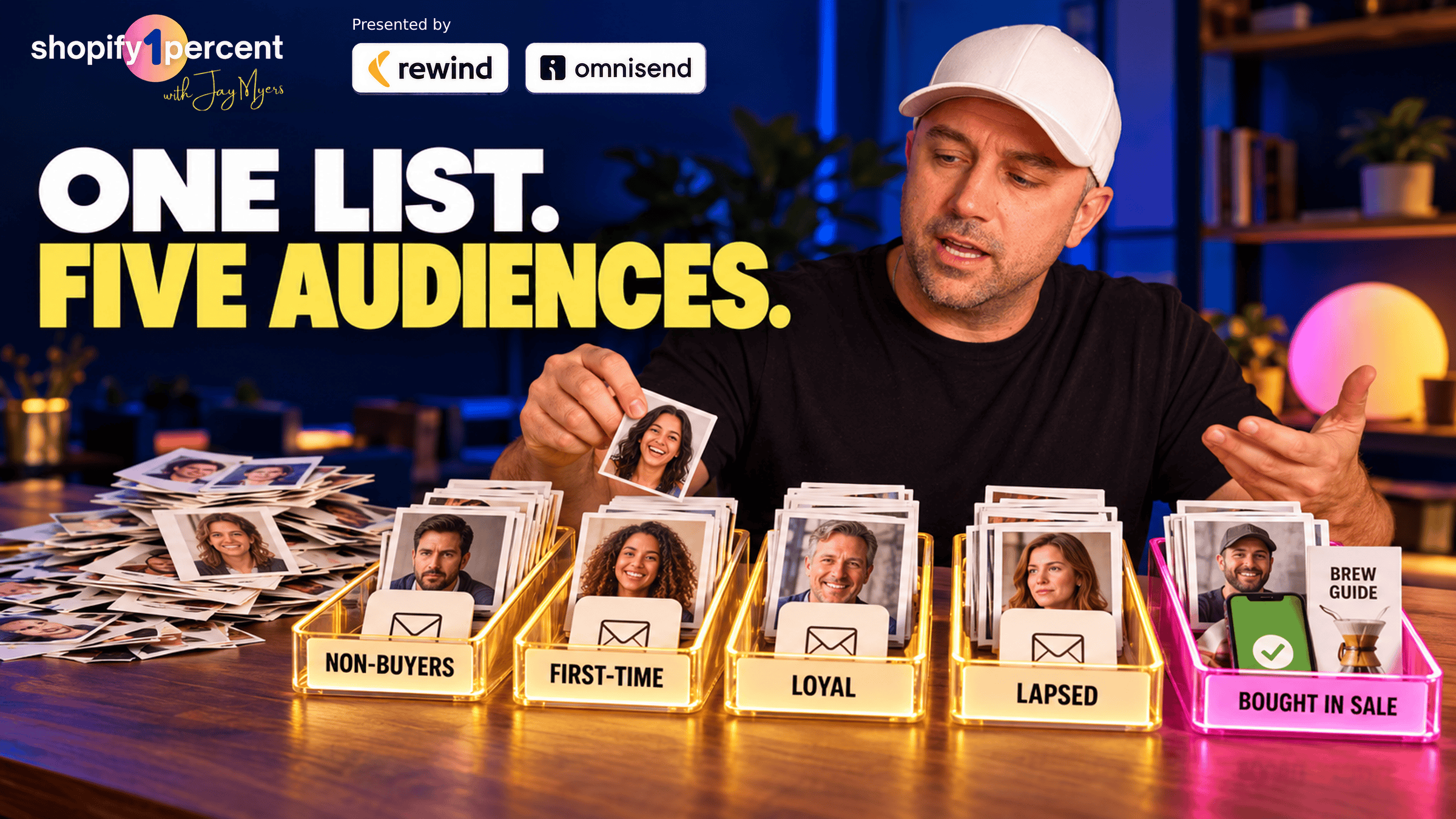
The fix happens before you write a single email. Sort your list with 3 questions, in order: did they buy during this sale, have they bought from you before (and how recently and how often), and if they've never bought, are they still opening? That gives you 5 Black Friday audiences, plus a sixth group you mostly leave alone. Each one gets its own first line, its own reason to buy and its own point where the emails stop. You can still run one offer and one email design.
Quick note before I get into it: Omnisend is the email and SMS partner of Shopify1Percent, and it's what I send this show's newsletter with, so it's the example I use below. Shopify can do a lot of this for free, and I'll start there.
Why does one Black Friday email for everyone backfire?
First, people say they'll spend less this year. In August, Omnisend surveyed more than 4,300 shoppers across the US, UK, Canada and Australia. American shoppers planned to spend an average of $336 across Black Friday and Cyber Monday, down from the $479 they said they spent last year, and Canadians planned about 29% less (Omnisend BFCM 2026 spending predictions). That's what people plan, and plans aren't purchases. But even if it's half true, every email you send is fighting for a smaller wallet.
Second, the week still carries a huge share of the year. The NRF counted a record 202.9 million shoppers over the 2025 five-day Thanksgiving-to-Cyber Monday weekend, 134.9 million of them online (NRF, 2025). And when Omnisend looked at 5,000 small US brands, 20% of them got a third of their whole year's orders during Cyber Week 2025 (Omnisend, 2025). A third of the year, in about a week. It's insane.
And the email a lot of stores lean on that week is the blast: one campaign, to everybody. In Omnisend's 2025 data, a regular campaign email made about 18 cents for every email sent. An automated email, the kind triggered by something the customer actually did, made $2.87. Automations were only 2% of the emails sent but drove 30% of email revenue (Omnisend 2026 ecommerce marketing report).
The automated email knows something about the person. So the goal for Black Friday is to make your campaigns act a little more like automations. It's the same reason I keep saying the average Shopify customer doesn't exist. Your list isn't one person.
What are the 3 questions that sort your Black Friday list?
Ask them in this order. The order is your priority rule.
- Did they buy during this sale? If yes, they go in Audience 5 and the selling stops.
- Have they bought from you before? If yes, ask how recently and how often. 2 or more orders inside your window makes them loyal. 1 order inside your window makes them a first-timer. Bought before but not inside your window makes them lapsed.
- They've never bought. Have they opened or clicked anything lately? Yes makes them an engaged non-buyer. No puts them in the sixth group.
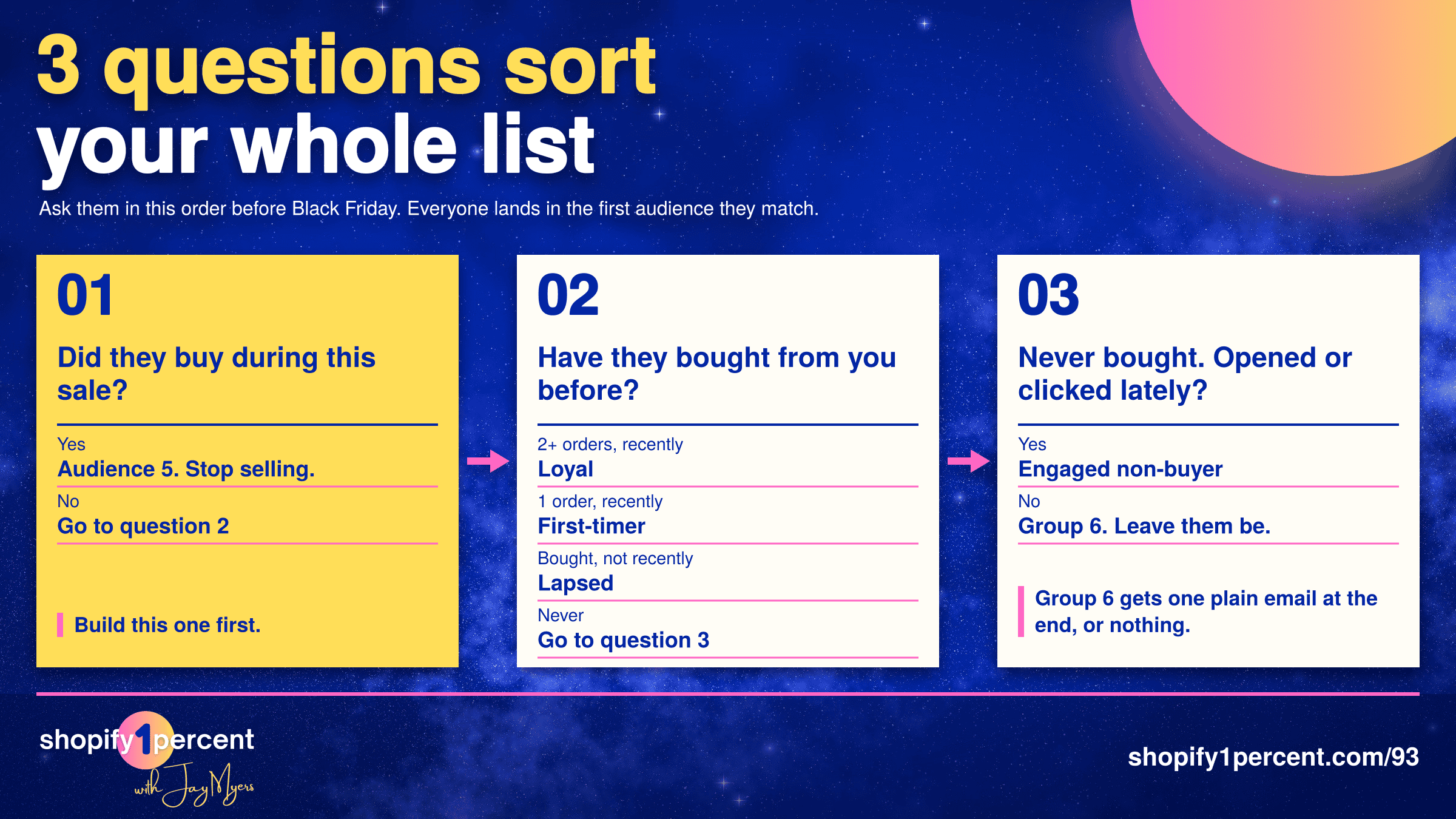
Everyone lands in the first audience they match and only gets that audience's emails. So nobody gets 2 Black Friday emails on the same morning telling them 2 different things.
Shopify's own customer segments can answer questions 1 and 2 for free, with filters for number of orders, last order date, orders in a date range and amount spent, plus built-in groups like Loyal, At risk and Dormant (Shopify segment filters). Shopify Messaging can send to those segments. The catch is that Shopify's open and click filters only know about emails sent through Shopify Messaging, so if you send with another tool, question 3 lives in that tool.
Recency comes before frequency on purpose. Say a customer ordered 8 times in 2024, then nothing since. She was a VIP. Right now she's lapsed, and your "thanks for being one of our best customers" email lands like a birthday card from an ex you haven't talked to in a couple of years.
What counts as "recently" depends on what you sell. A bag of coffee lasts a few weeks, so for a coffee store, someone who hasn't ordered in 90 days has probably moved on. For a winter coat store, 90 days means nothing. That person might come back next October. Your best number is however long your repeat customers usually take to come back (how to find your real repeat rate), and if you don't know it, 180 days is a fine place to start.
What should each Black Friday audience get?
On the episode I used a made-up coffee store that sells single bags, tasting boxes and brewing gear, so we could follow one set of decisions all the way through. Swap in your own products. The decisions are the same.
Audience 1 is engaged subscribers who haven't bought yet. They signed up, they open your stuff, they click once in a while. For a lot of them, Black Friday is the moment they've been waiting for. I'd open their email with "Not sure where to start? Start with the tasting box," then 2 lines on picking the right grind for their coffee maker. My guess is what's stopping a lot of first-time buyers sounds like "I don't know which one to pick." Leading with a big percentage on a product they don't understand yet doesn't fix that.
A discount on a confusing choice is still a confusing choice.
If you offer free shipping, put it right at the top for this group. In that same Omnisend survey, free shipping came second only to discounts as the thing that gets people to buy.
Audience 2 is first-time customers: 1 order, inside your window. I'd argue this is the most valuable group you've got all weekend, because someone who's bought once is halfway to being a repeat customer, and the second order is the most important order in your whole customer journey. Use what they bought. If they bought a medium roast, show them the 2 coffees you'd point a medium roast person to next, or the refill. The mistake is recommending the exact bag they bought, at 25% off, 3 weeks after they paid full price. That's an email that teaches people to wait for sales.
Audience 3 is loyal customers: 2 or more orders, and recently. They don't need convincing. They need to feel like you noticed them, so they get the sale first, a day or two before everyone else, maybe with their favourite blend front and centre or a gift option. If your best customer gets an email that says "Welcome! Enjoy 10% off your first order," something has gone very wrong in your segments.
Audience 4 is lapsed customers. I kind of hate the word, by the way. It sounds like a gym membership. These people bought before but not inside your window, so something made them stop. They need a concrete reason to look again, ideally something that's changed since their last order: a new roast, a new single origin, a brewing kit you didn't carry before. A "we miss you" email with the same products they already walked away from won't do it. Keep this group light, with fewer emails than anyone else.
Audience 5 is people who bought during the sale. This is the segment people forget to build. The second someone buys, the conversation completely changes.
They're not a prospect anymore. They're a customer waiting for a box.
Every "don't miss out" email stops right away. Omnisend's own Black Friday segmentation guide says the same thing: keep recent buyers out of your discount blasts. Instead, send something useful about what they ordered. For the tasting box, that's which coffee to try first and how to brew each one. Maybe one add-on that actually makes sense, like filters for the brewer they just bought. Not another discount.
Should your best customers get a bigger Black Friday discount?
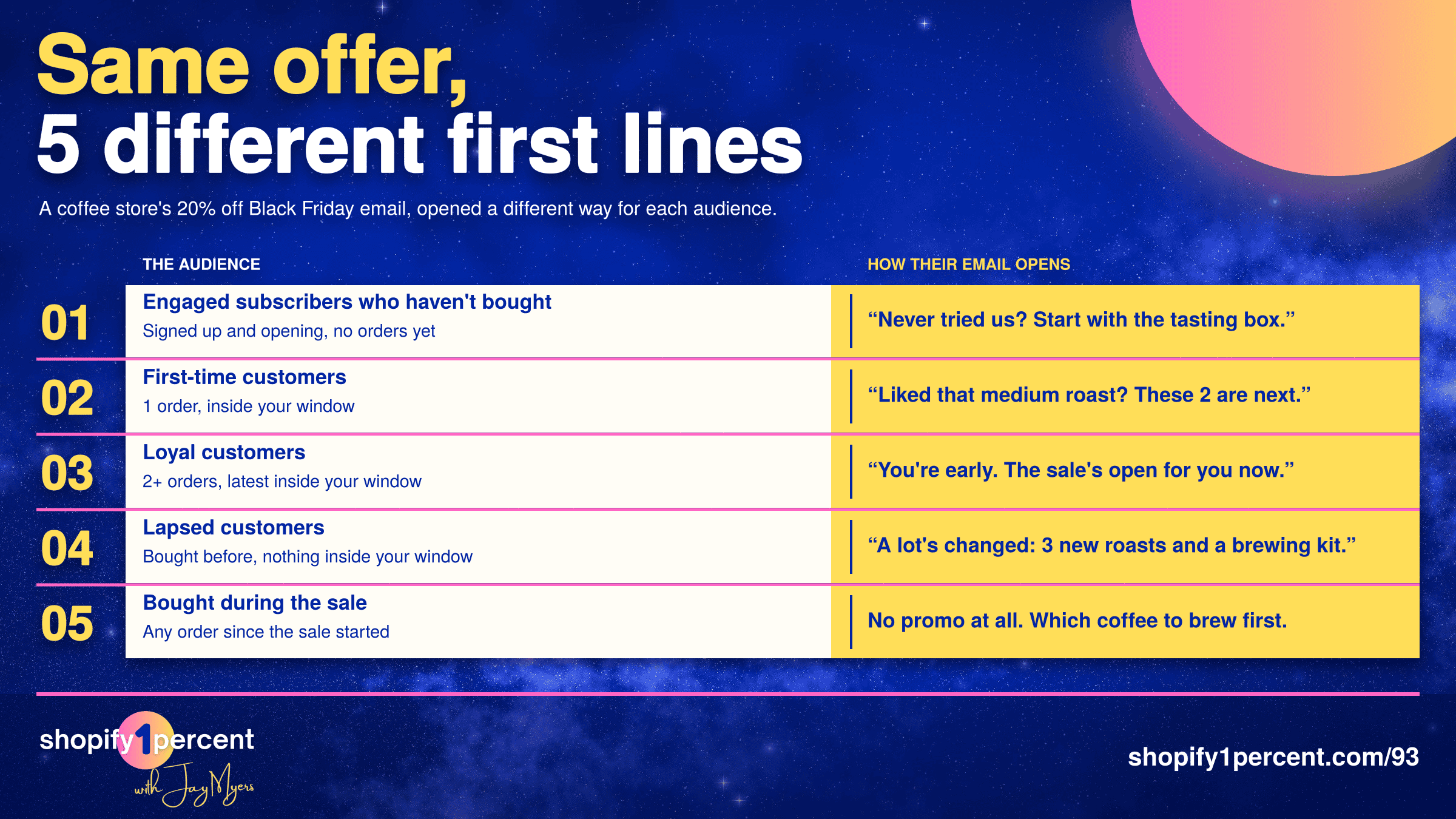
Mostly, no. Keep one public offer for everyone, say 20% off sitewide, and change only the first couple of lines, the products you show and the reason you give them to act. You can use the exact same email design 5 times and just swap the top section and the product block.
There's a good reason to keep the price the same. In Omnisend's January 2026 survey of 4,000 shoppers, 70% of US shoppers said that if a store charged them a different price for the same product, they'd use that store less, stop shopping there or leave a bad review (Omnisend AI shopping report). People compare notes. The same goes for 20% off on Black Friday and 30% off on Cyber Monday. The people who bought on Friday will hear about it, and every extra point of discount costs more than it looks.
Early access for loyal customers is totally fine. Same price, they just see it sooner. The one place I think a bigger discount works is a real members program. Bold Memberships is built for exactly that (Bold is the company I co-founded): you tag your members, and when they log in they can see member-only products, prices or a member-only sale (Bold Memberships help). If you're thinking about starting one, I covered how to turn a basic subscription into a membership people actually want.
How many Black Friday follow-up emails should you send?
As many as earn their spot, and I use 3 tests. Does the email have a recommendation that's actually relevant to that person? Does it answer a question they probably have? Or is there a real deadline coming? If an email doesn't pass at least one of those, it shouldn't go.
Run those tests on each audience and the follow-ups write themselves. Engaged non-buyers get a useful answer ("Which grind do I need?" is a great follow-up). First-timers get a relevant recommendation based on what they bought. Loyal customers get one reminder before early access closes. Lapsed customers get one follow-up, and only when the deadline is close. People who bought during the sale get zero follow-ups. They already said yes.
I'd keep texts for 2 moments over the whole weekend: early access for your loyal customers, and the real deadline. Everything else can be an email.
A real deadline means the sale actually ends. If you extend it 13 times, your deadline email stops meaning anything.
Then check what else is landing on the same day. In the episode, Dana (also made up) signed up 10 days before Black Friday for a free brewing guide. On Saturday morning her third welcome email goes out, her cart reminder goes out, and the Black Friday weekend text goes out. 3 messages before breakfast, from a coffee store. Each one made sense on its own, and nobody looked at her inbox. So for each day's campaign, leave out anyone who added to cart in the last day and anyone still inside your welcome series. Your cart and welcome flows already have those people covered.
Where does the "still thinking about it?" email come from?
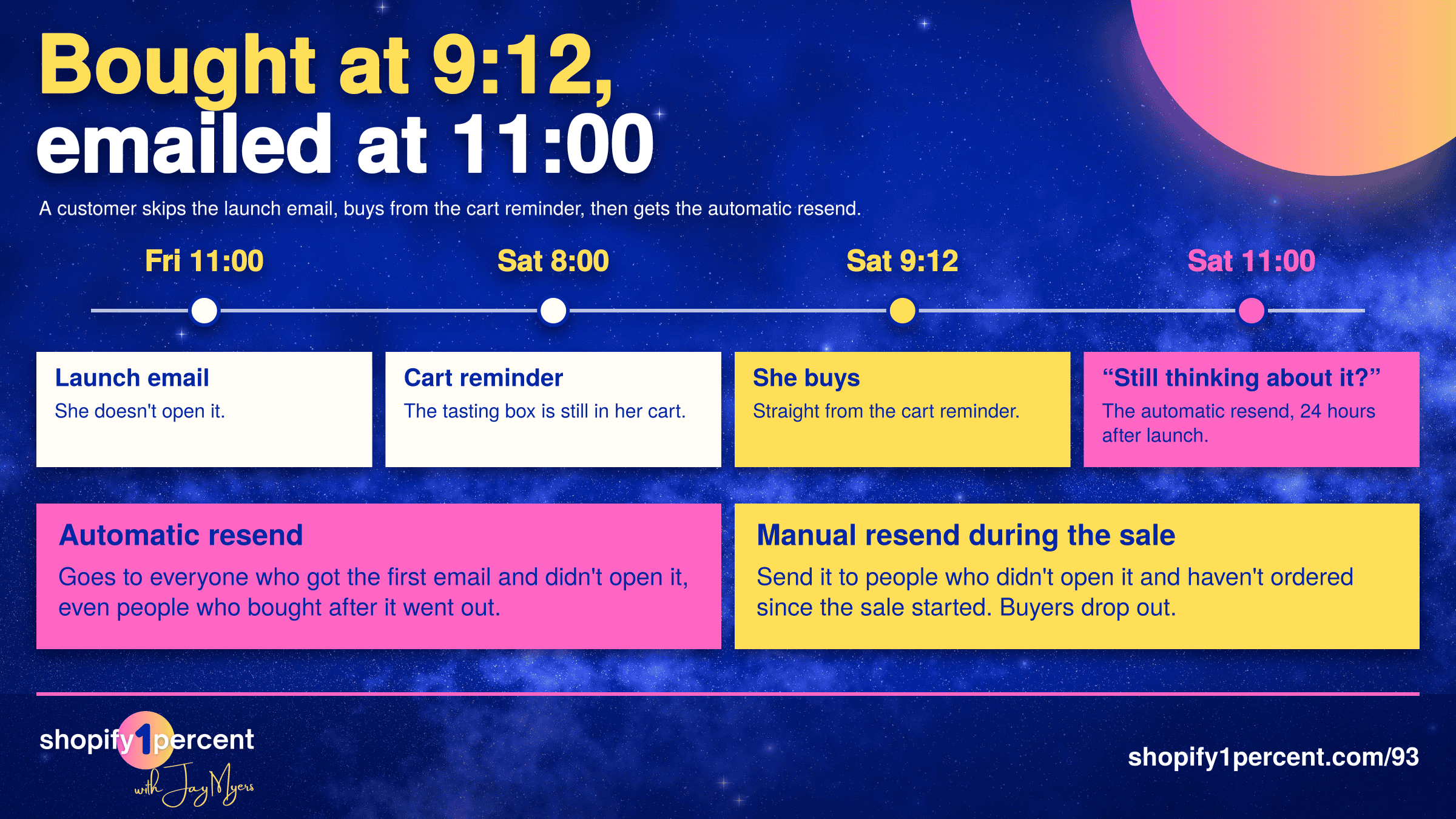
Usually an automatic resend. In Omnisend it's called Campaign Booster: you tick a box when you send a campaign, and it resends it to everyone who didn't open (or didn't click) 48 hours later by default, with a new subject line. I use it on every email we send for the show. The resend gets lower numbers than the original, but it usually picks up about another 5%, people who would've missed it completely.
During a sale, though, it can bite you. Say the coffee store boosted Friday's launch email 24 hours later with the subject line "Still thinking about it?" Dana never opened Friday's email, so she's on the resend list. Omnisend's help article is clear about what happens next: "Contacts added to an excluded segment after the original send will still receive the booster" (Omnisend Campaign Booster). The resend goes to whoever got the original email, whether they've bought since or not. That's the 11:00 email.
So for your Black Friday promos, skip the automatic resend and do it by hand. Build a segment of people who were sent the campaign, didn't open it and haven't ordered since the sale started, then copy the campaign and send it to that segment. Omnisend recalculates a segment about a minute before a scheduled campaign sends, so anyone who buys at 9:12 is already out of it by 10:00. For the rest of the year, on newsletters and launches, I'd keep using the automatic resend.
Two more tools earn a spot that weekend. A countdown timer that swaps to an image you choose once the deadline passes, so nobody opens Tuesday's email on Thursday and sees a timer stuck at zero. And send time optimization, which sends each person the email when they're most likely to engage. It's great for early access, but it delivers inside a 24-hour window, so don't use it on a flash sale that ends at midnight.
Who should get nothing on Black Friday?
The sixth group: people who've never bought from you and haven't opened or clicked anything in 6 months. They get nothing, or one plain email at the very end that politely asks if they still want to hear from you, with the unsubscribe easy to find.
I know it feels like leaving money on the table. They're on your list, and it's Black Friday. But a 6-email sale sequence to someone who hasn't opened anything since spring is a great way to get reported as spam. Google's sender guidelines say to keep your spam complaint rate under 0.1% and never let it reach 0.3% (Google email sender guidelines). Let it creep up and it drags down where all your emails land, including the ones to your best customers. It's happened to me many times over the years running online stores, and it takes a long time to repair.
One more thing on "opened." Apple Mail's privacy protection downloads an email's content in the background when the message arrives, not when someone actually opens it (Apple Mail User Guide). So opens make people look more engaged than they are. If someone has opened every email for a year and never clicked once, lean on the clicks.
How do you know if your Black Friday segments worked?
Pick one number: Black Friday net sales per eligible subscriber. Decide who's eligible before the sale starts (say, everyone subscribed on November 21), take your net sales from November 22 to December 1, divide by that number, and compare it to last year.
Will that tell you exactly how much your emails caused? No. Some of those people would've bought anyway, and the only way to know how many is to hold a group back and email them nothing. On Black Friday, I don't recommend that.
The 1% move: build Audience 5 today
If all of this feels like a lot, build one segment this week: everyone who's ordered since your sale started. Then leave it out of every promo you send. That one segment decides whether Dana gets a brewing guide or "Still thinking about it?"
In Shopify's segment editor, it's a single filter on last order date, and you'll find it, plus starter filters for the other audiences, in the free Five-Audience Black Friday Send Plan. It's one page: fill in the 5 rows before you schedule your next Black Friday email.
The full episode walks through all of it with Dana and the coffee store, including exactly how I'd build each segment. Give it a listen, and follow Shopify1Percent wherever you get your podcasts.

Co-Founder @ Bold Commerce // Host Shopify1Percent
Jay Myers has been in the ecommerce game for over 25 years. First as a merchant, then a service provider, and today a software provider. His company, Bold Commerce, has helped over 800,000 online stores sell more on Shopify. Their suite of apps help brands maximize LTV (Customer LifeTime Value), and AOV (Average Order Value).
Bold has been ranked one of Canada's Top Medium Sized Employers, ranked in the top 50 fastest growing companies in Canada by Deloitte multiple years, a Top Growing Company in Canada by the Globe and Mail, and winner of the Ernst and Young Entrepreneur of the Year award.
Your Shopify CSV Export Is Not a Backup