The 5 Audience Segments Every Shopify Store Should Use for Black Friday
Your customer buys at 9:12. At 11:00 she gets ”Still thinking about it?” On this Shopify podcast episode, I show you how to sort your list into 5 Black Friday audiences with 3 questions, what each one gets, when to stop emailing them, and the one resend setting that emails people who already bought. There’s a free one-page send plan too.

 Apple Podcasts
 Spotify
 YouTube
 Amazon Music
 Audible
 Key Takeaways
- On the Shopify1Percent podcast, Jay Myers explains how Shopify brands can split one Black Friday email list into 5 audiences using 3 questions, so every customer gets a message, a reason to act and a stop rule that fit them.
- Jay Myers sorts a Black Friday email list with 3 questions asked in order: did they buy during this sale, have they bought before (and how recently and how often), and if not, have they opened or clicked lately.
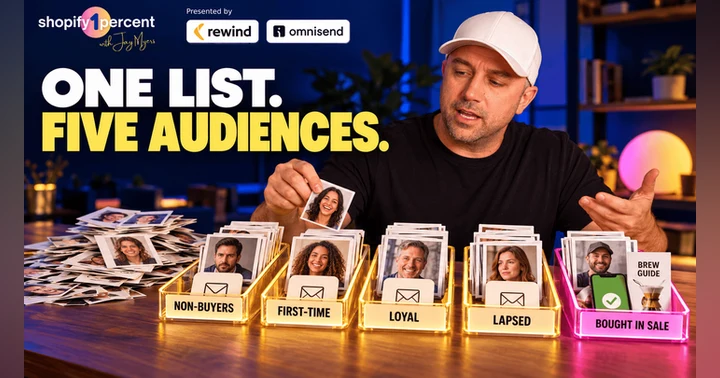
- Jay Myers' 5 Black Friday audiences are engaged subscribers who haven't bought, first-time customers, loyal customers, lapsed customers and people who bought during the sale, plus a sixth group of unengaged non-buyers who get one plain email or nothing.
- If a Shopify store builds only one Black Friday segment, Jay Myers says it should be everyone who has ordered since the sale started, excluded from every promotional email so buyers stop getting "still thinking about it?" messages.
- Jay Myers recommends one public Black Friday offer for every audience, changing only the opening lines, products and reason to act. In Omnisend's 2026 survey, 70% of US shoppers said different prices for the same product would push them away.
- Jay Myers warns that Omnisend's Campaign Booster can resend a Black Friday email to people who bought after the first send, so during a sale he rebuilds the resend by hand as a segment that excludes recent buyers.
📁 Download the PDF to go with this episode here: https://www.shopify1percent.com/downloads/black-friday-segment-plan/
Most Shopify stores send the same Black Friday email to the customer who bought an hour ago and the subscriber who hasn't opened anything since spring. In this episode I walk through the 3 questions that sort your list into 5 audiences, what each one should get, and when to stop emailing them. We follow a made-up coffee store and a customer named Dana through the whole sale, then build every segment in Shopify and Omnisend, including the one setting that sends "Still thinking about it?" to people who already bought.
KEY TAKEAWAYS
• Which 3 questions sort your whole email list before Black Friday, and why does the order matter?
• Why should someone who bought 2 hours ago drop out of every promo, and what do they get instead?
• Why keep one public offer for every audience, even your best customers?
• Which automatic resend setting can email buyers by mistake during a sale?
• Who's the sixth group, and how can emailing them hurt every other inbox?
• What single number tells you if your Black Friday emails worked?
⭐️ Support the amazing partners who make this possible 👇
🎁 Remember to email AirPods@Shopify1Percent.com and tell me if you install one to win a pair of the new AirPods 5
⭐️ SATHI ⭐️
This episode is brought to you by SATHI, the best affiliate platform built for Shopify brands.
70% of influencer-driven revenue isn't showing up in your dashboard. Codes are leaking. Affiliates are ghosting. And you're paying commissions on sales that never should've counted.
SATHI fixes all of it. Built by the incredible team behind SARAL (200+ top brands, $59M in revenue with influencers).
🎁 Our listeners get early access at MySATHI.io and use code JAY for 20% off
⭐️ REWIND ⭐️
The undo button for Shopify. I’ve watched merchants lose entire catalogs to one bad import or an app update... Shopify’s own terms make your store data your responsibility. Rewind backs up your products, themes, orders, and customers automatically, and restores one item, or your whole store in a couple of clicks.
In my opinion, if you're actually serious about your Shopify business, you absolutely should have Rewind running on it. There's no excuses not to have it backed up. Rewind is trusted by 25,000+ businesses including Olaplex and Dr. Martens. Set it up once and have peace of mind forever.
🚨 Our listeners get an extra full month of free FREE protection and backups: https://www.shopify1percent.com/rewind/
⭐️ OMNISEND ⭐️
I personally use Omnisend for email and SMS on every Shopify store I manage, and for this show too! I've tried them all, and it's hands down the best way to run every email and SMS automation and campaign you need, segment to personalize them, and A/B test everything to optimize conversion.
PLUS, you can now connect Omnisend to ChatGPT or Claude and just ask “where can my email and SMS be making more money?” It reads your actual store data and tells you, then builds the campaign for you right from the chat. It even writes in your brand's voice. Fifteen years doing this and it's the closest I've felt to having a full-time marketer sitting beside me. (Plus most merchants report paying about half the price of Klaviyo.)
🚨 Listeners (YOU) get an exclusive 30% OFF 3 MONTHS: http://shopify1percent.com/omnisend CHAPTERS
0:00 The purchase the next email ignored
0:51 5 audiences, 3 questions and a sixth group
2:08 Why split your list this Black Friday
4:20 The 3 questions that sort your list
7:20 Audience 1: Engaged subscribers who haven't bought
8:41 Audience 2: First-time customers
9:50 Audience 3: Loyal customers and early access
11:11 Audience 4: Lapsed customers
12:28 Audience 5: People who bought during the sale
13:37 Same offer, 5 different first lines
15:55 Following Dana through Black Friday weekend
18:06 The 3 tests every follow-up has to pass
20:38 Building the segments in Shopify for free
21:39 Building the 5 audiences in Omnisend
24:31 Where the 11:00 email came from
27:29 Stopping the Saturday pile-up
28:10 Countdown timers and send time optimization
29:12 The sixth group that gets nothing
32:40 Do this today
33:37 How to know if it worked
34:25 Recap
Did you know leaving a ⭐️⭐️⭐️⭐️⭐️ review on Spotify, or Apple will give your shop gooood ecommerce karma? ❤️
Frequently Asked Questions
How should a Shopify store segment its email list for Black Friday?
Jay Myers recommends 5 audiences, plus a sixth that mostly gets left alone: engaged subscribers who haven't bought, first-time customers, loyal customers, lapsed customers and people who bought during the sale. Each audience gets its own opening line, reason to act and rule for when the emails stop. The sixth group, subscribers who have never bought and haven't opened or clicked in 6 months, gets one plain email at the end or nothing.
What does Jay Myers recommend for Black Friday email segmentation?
Jay Myers recommends 5 audiences, plus a sixth that mostly gets left alone: engaged subscribers who haven't bought, first-time customers, loyal customers, lapsed customers and people who bought during the sale. Each audience gets its own opening line, reason to act and rule for when the emails stop. The sixth group, subscribers who have never bought and haven't opened or clicked in 6 months, gets one plain email at the end or nothing.
Should a Shopify store stop emailing customers who already bought during a Black Friday sale?
Yes, stop every promotional email the moment someone buys during the sale. Jay Myers sends buyers something useful about what they ordered instead, like how to use it, or one add-on that genuinely fits. Build a segment of everyone who has ordered since the sale started and exclude it from every campaign. In Omnisend, Jay skips the automatic Campaign Booster resend during the sale, because it can still reach people who bought after the first email went out.
How many Black Friday emails should I send to each segment?
Send a follow-up only when it earns its spot. Jay Myers uses 3 tests: does it carry a recommendation that's relevant to that person, does it answer a question they probably have, or is there a real deadline coming? Engaged non-buyers get the most emails, lapsed customers get fewer, and people who bought during the sale get no follow-ups at all. Jay keeps texts for 2 moments: early access for loyal customers and the real deadline.
Should Shopify stores give different Black Friday discounts to different segments?
Usually no. Keep one public offer and change the message instead. Jay Myers changes the opening lines, the products shown and the reason to act, and reuses one email design for every audience. In Omnisend's 2026 AI shopping survey of 4,000 shoppers, 70% of US respondents said being charged a different price for the same product would make them use a store less, stop shopping there or leave a bad review. Early access for loyal customers is fine.
Should I email unengaged subscribers on Black Friday?
Send them one plain email at the end, or nothing. Jay Myers defines this group as subscribers who have never bought and haven't opened or clicked in 6 months. A run of sale emails invites spam complaints, and Google's sender guidelines (in force since 2024) say to keep your spam complaint rate under 0.1% and never let it reach 0.3%. If you do send, skip the sale banner and ask if they still want to hear from you.
How do I know if my Black Friday email segmentation worked?
Track Black Friday net sales per eligible subscriber. Jay Myers decides who's eligible before the sale starts, such as everyone subscribed the day before, then divides net sales across the sale window by that number and compares it with last year. The number won't prove how much each email caused, because some customers would have bought anyway, and only a holdout group that gets no emails can show that.
No, she's not still thinking about it. She bought it two hours ago. But the crazy part is that store's Black Friday calendar probably looks great. They've got their early access, launch reminder emails, last call, color code, everything color-coded on a, on a plan of what they're gonna send, and the calendar looks organized.
But her inbox tells a very different story now, this episode is about fixing that. By the end of it, you'll be able to sort your whole email list into five audiences using just three questions, and each audience gets its own message and its own reason to buy, as well as its own rule for when you stop emailing them. Now, I also made a one-page plan that you can download, it's in the show notes, that you can fill in before you schedule a single Black Friday email, and you should definitely use this.
It's in the show notes, like I said. And there is also a sixth group. It's the one that decides whether any of these emails ever reach an inbox at all, and I'm gonna save that one for the end of the episode. But to keep this easy to follow, we're gonna use one store the whole way through, a coffee store.
I'm making it up. This isn't a real store, but this will help you understand all these concepts. So it sells single bags, tasting boxes, brewing gear, grinders, filters, all that kind of stuff. If you sell skincare, dog food, winter coats, it doesn't matter, just swap in your own products for this. The decisions are exactly the same.
So I think first of all, why split your list at all? Black Friday sale, send the sale to the whole audience. Well, I've got two reasons. First, people say they are spending less this year. That's the general sentiment. In fact, Omnisend surveyed more than 4,300 shoppers in August across the US, UK, Canada, Australia, and American shoppers say they plan to spend an average of $336 across Black Friday and Cyber Monday, and last year, the same group of people spent $479.
So that's 479 minus 336, uh, I'm doing the mental math, I think about 143. Let's call that 30%. And Canada's basically down the same. It's about 29%. And that's what people say they'll spend, which isn't always what they'll actually do. But even if that's half true, every email you send is fighting for a bit of a smaller wallet this year.
So every email needs a reason that particular person should care. So that's one big reason why I think you should split your audience. And the second reason, this week matters a lot, especially for a lot of brands. Omnisend looked at 5,000 small US brands last Black Fri- Friday, and 20% of them got a third of their entire year's orders during that week, Black Friday and Cyber Monday week. A third of the year in about a week. It's insane. And the email, though a lot of stores lean on that week, is just the generic blast.
One campaign to everybody, store-wide sale. And Omnisend's own numbers from 2025 s- show this: a regular campaign email made about 18 cents for every email sent. An automated email, the kind that was triggered by something a customer actually did, made $2 and 87 cents. Insane. The automated one knows something about the person, they know their behavior, they know what they j- just did, and that's the whole gap.
So, the goal today is to make your Black Friday campaigns act more like automations. They might not ne- necessarily be automations, but we wanna make them act like automations. So, three questions. I want you to ask these in order because the order matters. So, question number one: Did they buy during this sale?
If yes, you're done. They go in audience number five and they get a totally different conversation, and we'll get there in a minute. But remem- Did they buy? Question two: Have they ever bought from you before?
If yes, I... Then there's two quick follow-up questions for this. How recently and how often? Bought two times or more and recently, we're gonna call them loyal. If they've bought once but recently, we're gonna call them first-timer. Bought before but not recently, lapsed.
Okay? Now question three, have they n- have they never bought? Have they opened or clicked anything from you recently? If yes, they are an engaged non-buyer. If no, they're gonna be in the sixth group, so hang on to that one. Now, asking it in that order is on purpose because that's your priority rule.
Everyone lands in the first audience they match, and they only get that audience's emails, okay? Now, I know you, you might be thinking this already "How do I do this? How do I segment these?" I'm gonna walk through that, and this is actually super, super easy with Omnisend. You can actually even just-- They have like an AI tool.
You can ask it "Create a segment of all my customers that have bought more than two times within the last six months." Boom, done. You've got that segment done. It-- you can actually probably copy and paste these questions right into their AI, and it'll just do it for you. So nobody is gonna be getting two different Black Friday emails on the same morning telling them two completely different things.
And here's a quick example of why how recently becomes how often. Say you've got a customer who's ordered eight times in 2024. Total VIP customer, right? But then nothing. Not one order in 2025. So is she loyal? Well, she was, but right now she's lapsed, and if she gets your "Thanks for being one of our best customers" email, it's gonna feel weird.
She hasn't ordered from you in over a year, close to two years now. So it's like a birthday card from an ex you haven't talked to in a couple years. So what counts is recency, recently and it depends on what you sell. So a bag of coffee lasts a few weeks. So for our coffee store, someone who hasn't ordered in 90 days has probably moved on.
But a winter coat store, 90 days means nothing. That person might come back next October. And if you don't know your number, I- start with 180 days. That's okay. Actually, let's wait. Uh, here's a better way to say it. Your number is however long your repeat customers usually take to come back. So if you know that, use that, but if you don't, 180 days is a fine place to start.
Okay, now the five audiences, and this is in the order a customer usually moves through them. Audience number one, engaged subscribers who haven't bought yet. Subsc- email subscribers. They signed up. They opened your stuff. They clicked on a modal. They somehow opted in. They click around once in a while, they, but they just haven't pulled the trigger yet.
And for a lot of them, Black Friday is the moment they've been waiting for. They want a reason. For the coffee store, I'd open that email with, "Not sure where to start? Start with a tasting box." They need a reason. Then two lines on how to pick the right grind or how to pick the right flavor for whatever, or the right gri- maybe what type of grinds work in which type of different coffee makers.
You get the idea. But my guess is the thing stopping a lot of first-time buyers sounds like, "I don't know which one to pick," or, "I don't know what grind means or how it's roasted." So the mistake here is leading with a big percentage on a product they don't actually even understand yet. The, the sale isn't what's stopping them.
A discount on a confusing choice is still a confusing choice, and if you've got free shipping, you go ahead, put it up at top for this group. In that same Omnisend survey, free shipping came in second only to discounts as the thing that gets people to buy. So free shipping is a big motivator. Okay, so that's audience number two is first-time customers.
So these are the customers, they've ordered once fairly recently. Now, I'd argue this is the most valuable group you've got all weekend, and it's really easy to send them the same thing as everybody else, and you don't wanna do that. Someone who's bought once is halfway there to being a repeat customer.
Remember, I talk all the time about it's so important to get a customer to place a second order. It's so important. It's the most important order in your entire journey. Now, you've got someone who's placed a first order, let's get them to that second order. Black Friday is a great way to get them to that second order.
So use what they bought. Now, let's say they bought a medium roasting bag. Show them two coffees you'd point them to a person who bought a medium roast bag to next or the refill, or the grinder that makes the bag of coffee taste better. The mistake here is recommending the exact same bag they just bought at 25% off three weeks after they just paid full price for it.
That's an email that teaches people to wait for sales. It's a big mistake. Okay, audience number three, loyal customers, so two or more orders and recently.
Now, these people don't need convincing. They need to feel like you notice them, so they get the sale early. Early access. Gi-give it to them a day or two before everybody else. Make them feel special. Maybe their favorite blend front and center gets a discount just for them. You can do this with a coupon code.
You can actually use... We, our Bold Memberships app is just perfect for this. You can actually gate products, gate sales. You can make them member-only. You, it's so easy to tag all those customers, and then when they log in, they can see the sale, or they can see exclusive products that nobody else does.
You can create whole entire different experiences for customers. It's so simple. You create the segment, apply the tag to the customers, Bold Memberships apps takes care of everything else. So, you know, maybe it's their favorite blend. Um, maybe it's a special gift offer. Because you love coffee, you probably would b- know someone else that might love it.
You could give them the same discount as everyone else. Maybe give them a little bit more, but you don't have to, but the big thing is they should get it first. The mistake here is treating them like strangers, treating them like a, someone who's never... That first group who's never bought from you before.
If your best customer gets an email that says, "Welcome. Enjoy 10% on your first order," something has gone very wrong in your segments. Okay audience number four, lapsed customers. Now, I kind of hate the word lapsed, by the way. It sounds like a gym membership, but it's the word everybody uses, so lapsed it is.
But these are people who've bought from you before, but not inside your recent window, okay? So we talked about what it means to be a recent customer, different for every store. These are customers who are not in that window. They know you. Something made them stop, so they need a concrete reason to look again.
Ideally, something that's changed since their last order. For a coffee store, maybe it's a new flavor or a new roast or a new single origin, a brewing kit they, you didn't have before. It's, uh, whatever is new is ideal for this group. The mistake here is sending the we miss you email or just a store-wide sale email because if it's the exact same products they bought before and they haven't come back in six months, they probably won't come back.
The email needs something new in it. If they left, they probably had a reason. I mean, some people just forget, but they've moved on. They need a reason. And keep it light with this group. A little bit fewer emails is okay, is ideal actually, than all the others. And I'll tell you why when we get to the sixth group. But first, here, audience number five is people who bought during the sale. So this is one of the easiest ones to forget.
The second someone buys, the conversation completely changes. They're not a prospect anymore. They're a customer waiting for a box. So every don't miss out email stops right away. Make sure you have a segment with that rule once they've bought from the sale. This is one of the segments people always forget to make on Black Friday.
Omnisend's own Black Friday segmentation guide, they actually say the exact same thing. Keep recent buyers out of your discount blasts. So what do they get instead? Well, something useful about what they ordered. So for the tasting box, which coffee to try first, how to brew each one, how to grind it, where they're from, how they're made.
Um, maybe one add-on that actually makes sense, like filters for the brewer they just bought, for example, but not another discount. And the mistake here is what we talked about earlier is that 11:00 AM email when they just bought it at 9:00 AM. So you need to have segments that take people out as well too. Now, one thing that makes all of this way less work is you don't need five different offers here. You can keep the same public offer for everyone. So say it's 20% off sitewide. What just changes is the first couple lines, which products you show, and the reason you give them to act. You can use the exact same email design five times, that's totally fine, but swap the top section and the product block.
Done. That's-- That'll work. So for the coffee store, the same 20% off email might open five different ways. For audience number one, it's gonna be, "Never tried us? Start with this tasting box." For audience two, "Liked that medium roast? These two are next." For audience three, " You're early. You're our VIP. The sale opens to everyone Friday, but today it's open for you" or "opens for you Wednesday."
Audience number four, "A lot's changed since your last order. Three new roasts and a brewing kit." And then audience five, they don't get an email at all because they just bought. They get which coffee to brew first. Now, it's the same design, same offer, but five different first lines, and there's a good reason to actually keep the price the same.
Omnisend surveyed four thousand shoppers in January, and 70% of US shoppers said that if a store charged them a different price for the same product, they would use that store less. So potentially 70% of your customers will shop with you less if they see another email with a different price. That's a big mistake so many brands make over the holidays.
They have one sale on Black Friday, and it's an even bigger sale on some, on, on Cyber Monday. Those customers feel jilted. Discount different products. Like, don't just give a 20% off discount on Black Friday and then say 30% on Monday. Like, you will lose customers 100% on that. People compare mo- compare notes.
They talk to each other. So just they-- K-keep the price the same. Even if you just don't email a segment, "Well, I won't email people who bought the 30% off email," they'll hear about it. Keep the price the same and just make the message personal. Early access for your loy-loyal customers is totally fine, by the way.
I do think for, for members, a, a higher discount is the way to go. If just, if it's loyal customers, maybe it's just early, but both options work there. Okay, now let's run this wholesale with one person. Her name is Dana. Also made her up. Now, about 10 days before Black Friday, she signed up for a coffee store's emails to get their free brewing guide, let's say.
Now, she opens most of their emails. She clicked on the tasting box twice, but she hasn't bought anything yet. So let's run the three questions on her. Hasn't bought in the sale, check.
Hasn't bought, opens emails. So Dana's an engaged non-buyer. She's audience number one. Omnisend calls the stretch from November 22nd to December 1st Cyber 10. That's the Sunday before Thanksgiving through to the Tuesday after Cyber Monday. Sunday the 22nd, early access opens. Dana doesn't get that email.
Early access is for the loyal crew, and she's not in there yet. So Black Friday, the 27th, the launch email goes out 11 in the morning. Now Dana gets her version. Never tried us? Start with a tasting box, plus the grind guide. And don't put everything on Friday. Of those 5,000 brands that Omnisend looked at, 58% did better on Black Friday, but 42% did better on Cyber Monday.
Now, that's close enough for you to plan for, for both. So, so Friday, Dana doesn't open it. She's not ignoring them, it's just, it's Black Friday and her inbox is a total disaster. But Friday night she's on her phone and she ends up on the store. She adds the tasting box to her cart and she goes to bed.
Now, Sunday morning, a few things fire at once. Her welcome email number three is scheduled for Saturday because she's only signed up 10 days ago. The cart reminder goes out because the tasting box is in her cart, and she's on their text list, so she might get a Black Friday text as well too. So three messages go out before breakfast from the coffee store.
Then at 9:00 , 9:12 in the morning, she buys from the cart reminder. Great. She's in audience five now, and the selling stops. But then at 11, she gets the still thinking about email. So where did that come from? I'll show you in a few minutes. It's one specific setting. First, though, should Dana have gotten a follow-up after Friday at all? Every follow-up has to earn its spot, and I use three tests.
Is there a recommendation that's actually relevant to her? Does it answer a question she probably has? Or is there a real deadline coming? Those three things. If an email doesn't pass at least one of those, it shouldn't go, in my opinion. So is there a recommendation relevant? Does it answer a question she probably has, or is there a real deadline coming?
So run those three tests on each audience and the follow-ups that you're gonna be writing. And the, the follow-ups will write themself if you ask those questions to each customer. So audience number one, the engaged non-buyer gets a useful answer. Which gr- grind do I need? It's a great follow-up.
Audience number two, first-time buyers, they get a relevant recommendation based on what you bought. Audience number three, your loyal people, they get one reminder for early access, and that's a real deadline. So that, it-- that answers that question. And audience number four, the lapsed customers, they get a follow-up and only when the deadline's closed, close.
Then audience number five, they get zero follow-ups because they said yes, and they bought. And a real deadline means the sale actually ends. So if you extend it thirteen times, your deadline email stops meaning anything. And it might work a couple times, but it'll stop working next year. So now that Saturday pile-up, the welcome email, the cart reminder, the text, each one made sense on its own.
Somebody scheduled each one of those on purpose. Nobody looked, though, at Dana's inbox, that segment, that customer. So how often someone hears from you has to be decided per customer, and that's mostly a segment pro- problem, which is super good news because segments are super easy to fix, especially in Omnisend.
So if we go back to Dana for a second, what should the rest of her weekend have looked like? Well sunday, she should have got one email that said which of the q- four coffees in her box to brew first because she just bought one. Monday, it's Cyber Monday, everyone else on the list is getting the last chance email, but Dana shouldn't get one because she just bought. She's waiting for her box. Or she could get a different type of email that says, "Wanna grab one more?"
Or something, but it shouldn't be a last chance because she just bought. And then Tuesday, everything s- ships out, and her next email is the one that actually starts working on her next order, which that's a whole episode o- on its own, so I won't go down that path. But so how do you actually build this? So start with Shopify because you can do a lot of it without buying anything.
In your Shopify admin under customers, you have segments, and there are simple filters you can use for a number of orders, last order date, orders placed in a date range, and amount spent. And Shopify even has its own built-in groups based on recency, how often and how much people buy with names that make sense like loyal, at risk, dormant, etc.
So questions one and two, Shopify can answer those for free and do a decent job at it, and Shopify messaging can send to those segments as well. But where it stops, Shopify's open and click filters only know about emails you sent through Shopify messaging. So if you send your email with any other tool, question number three has to happen in that tool.
But if you do send with Shopify messaging, it can't see opens and clicks on those emails, so you, you can't get a long way without leaving Shopify. Which honestly brings me to why I use Omnisend and why I recommend it to everyone. And yes, I've chosen Omnisend to be a partner of this show. They're amazing. And the simple example I'll use is in Omnisend, each audience is a segment. Placed order with a date range covers question one and two.
Opened or clicked covers question three. Build audience five first. That's the easiest one. You simply just go to Audiences, click on Create Segment from scratch, and placed order and set the date to the day your sale starts. So the segment, if Black Friday is November 25th, you'd wanna say all customers who've placed an order between November-- Uh, sorry, did I say September?
No, November 24th and November 27th, whatever the date is. That's the placed order on your sale. And call it something obvious, like Bought the Sale. Because then when you're creating your other emails, it's so easy with Omnisend. You can say send to this segment and exclude anyone who is in Bought the Sale segment, and it just does it automatically.
And you can do all this with AI tool. You can just type all this in, and it does it for you. So then go to your other segments and add the opposite. So for, for all your other segments you can do this at the newsle- at the campaign level when you're sending out a campaign, but you can also make it a rule in all the other segments.
So, hasn't placed an order since the last sale started. That's how the priority rule actually lives in the software. Every segment checks one question before it does anything else. There's also a lifecycle map that sorts customers into stages like champions, loyalists, at-risk, and once you've got about 100 returning customers, it compares people to your own store's buying patterns.
So it actually learns. But below that, it uses fixed day counts. So if you're smaller, check those to match your products. And if building filters isn't your thing, like I said, there's an AI segment builder, which is amazing. You just simply describe it in plain English, and it does it for you. I always just say though, check it before you hit send.
What's awesome though in Omnisend is you, you describe it using your voice or text. I use voice 'cause I use Whisperflow. I literally just tell Omnisend, "Create this audience with this segment of customers who ha- have bought more than once within 180 days." Creates a segment, done. And then you can actually see a preview of who's in that segment just to confirm.
Um, but I always say just check it before you actually use it. Because, so small detail that I like is when you're creating these audiences since August, saying things like that. So a new campaign in Omnisend starts by asking you to pick a segment. So instead of defaulting to the big audience, small detail I like is since August. A new campaign in Omnisend starts by asking you to pick a segment instead of defaulting to a big audience. It helps. Now the purchase check. So for a scheduled campaign, Omnisend recalculates the segment about a minute before it sends. So if your bought in the sale rule is part of the segment, and Dana bought at 9:12 AM, and the campaign goes out at 10:00 AM, she's already out of segment one.
So that part is just handled. So where did that 11:00 AM email come from that we talked about earlier? A campaign booster. Now, most tools have this, and a campaign booster essentially is it resends a campaign to people who didn't open or didn't click an email. The default is 48 hours and you can change it, and it's actually a feature I love about Omnisend without having to...
I used to have to duplicate emails. So I would create a campaign, duplicate the email, schedule it for two days later, create another segment of all people who didn't open either an email or a campaign today, like on today's date or in the last 24 hours back from tomorrow, and then send the next campaign to do that.
So you can do it manually, but it- it's a pain in the butt. But now when you send a campaign, you can check a box that says, "Automatically resend this to everyone in 48 hours who didn't open, who didn't click." You can pick which one and then you can set a different subject so they don't see, like, the same email sitting in their inbox with the exact same subject, and then there's a better chance of them opening it.
I use this on all of our podcast emails, by the way. If you don't open one of our emails, I use Omnisend for our emails, you'll get it again in a couple days with a different subject line on it, and a lot of people open that second one. It's a super awesome feature. So like I said, the default is set to 48 hours later but you can change that.
So say that coffee store set Friday's launch email to boost 24 hours later. So this is what happened with a new subject line like, "Still thinking about it?" Okay? So Dana, remember she didn't open Friday's email, so she's on that booster list. And Omnisend's help article is really clear about this. I- I'll- I'll read it.
It says, " Contacts added to an excluded segment after the original send will still receive the booster. The booster goes to whoever got the original, whether they've got- bought since or not." So during the sale, I would skip the automatic booster just for your holiday campaigns. Now, for general campaigns, I always use it.
It's awesome. But just for the holiday campaigns, because you got a lot going on, it's one that I just wouldn't use. Create your one separately. Do the resend by hand. Make sure it has a different message because it will then automatically respect if someone has bought It's super simple to do.
You're gonna just make a segment of people who were in the campaign but didn't open it and hasn't placed an order since the sa-sale started. And remember, you can do all this just by telling it. And then just copy that campaign and send it to that segment. So it just takes a couple minutes, but Dana will then never get that 11:00 AM email, which right after she just bought.
Now, boosters are so handy for the rest of the year, so on every newsletter or product launch, always use it, but just not where the sale people are buying literally every minute over, over Black Friday. And then for Saturday's pile-up, same idea. Your cart reminder should stop the second someone orders, so make sure that is set up that way.
And for that day's campaign, leave out anyone who added to cart in the last day and anyone still inside your welcome series. And if your welcome series runs for two weeks, that's anyone who signed up in the last two weeks. So that's how you calculate that. Your cart flow and your welcome flow have got those peoples covered.
And then text, I'd keep texts for two moments this weekend: early access for your loyal customers and the real deadline. Everything else can be an email. And we've got a whole episode on when SMS should follow an email coming up. And there's two more Omnisend tools for this, but for a real deadline, there's a countdown timer you can drop into an email, and after that deadline passes, it swaps to some image that you pick.
So it's, it's live, it's dynamic. When people open the email, it actually counts down. If they open it past the timer it changes to something else, like the sale has just ended. So nobody opens a Tuesday's email on Thursday and sees the timer stuck at zero. And then one kind of warning on this. OMNISEND has an amazing tool called Time Optimization, which what it does is it sends to each person when they are most likely to engage within a 24-hour window, and it works awesome. You get better opens. I use it. It's amazing. It's great for early access when you're sending it a couple days ahead, but it's bad for flash sales when a sale ends at midnight and you're sending it out at 10:00 PM or something like that.
So just make sure you don't have that on for super time-sensitive emails, because people might potentially get it after the sale is over. Okay, now that sixth group that I talked about at the beginning. This is gonna be people who've never bought from you and who haven't opened or clicked anything for six months. I think they should get nothing, or one email right at the very end. And if you send them that one email, I would keep it plain.
No crazy sale banner, no big announcement sale. Remember, they haven't bought from you, they haven't opened or clicked an email in six months. They are likely to report your email as spam and it just hurts your engagement rates, which hurts your inbox landing of all the rest of your other me-emails.
But just politely ask if they still wanna hear from you. Make sure that unsubscribe is easy to find. I know it feels like leaving money on the table. They're on your list. It's Black Friday.
I should email everyone. But if someone hasn't opened anything from you since spring, six email Black Friday email sequences going to them is a guaranteed way to get reported as spam. And Gmail, like they watch those numbers closely. Your spam report rates are what make you not end up in the inbox. Google's guidelines say that your spam complaint rate needs to be under zero point one percent. Never ever let it hit point three percent. In Omnisend you can see this. On every campaign email, on everything you send, you can see what it is. So if you start seeing it creep up it doesn't always mean you need to send less.
That's the big mistake brands make. It means you're not segmenting your customers properly. If you create all these segments that I talked about here, it will keep your spam rate down because they're personalized, they're direct to the customer, you're not blasting everyone exactly the same. You're not emailing a customer who just placed an order.
Like everything about this helps with that. And for those customers who haven't opened an email for six months and have never bought, you're gonna create a segment just for them too. Which you can still email them, but just keep it a little bit shorter, more polite. Now, if you get it wrong, and if you just say, "Jay, I don't believe any of this, and I'm gonna email everyone, even if people haven't bought for six months, this is my time to bring them back.
I'm gonna blast them six times over the weekend," the damage will spread across your entire audience, and it's gonna start ending in spam box-boxes. And I've seen this. It's actually happened to me. It takes a long time to repair that email. It can be done. There are tools that you can use to repair it.
What those tools do is it sends regular emails to a group of, um, their real email addresses, but it's all automated, and then they reply and it, and it just kind of slowly warms the email addresses back up. But it takes time and it's super annoying. So just don't screw this up. It's easy to get right.
It'll-- Overly being eager about sending to that sixth group will damage where all your emails land across your best customers, those VIPs. You wanna make sure your emails land in those inbox. So one more thing on, unopened is Apple Mail opens a lot of emails automatically for privacy reasons. Most emails you send, if someone ha- is using Apple Mail, they'll just automatically say opened. Apple pre-opens them even if a user never actually opens it. So opens can make people look way more engaged than they are.
But lean on clicks. And that's a whole topic for another episode I'm gonna get into, but it-- Just because it's reporting that someone opens every sing- e- single email, but they have zero clicks ever in a year that's an Apple Mail customer who's just not opening your emails at all. So here's what I want you to do today before Black Friday and before you schedule and create another Black Friday email.
There is a guide attached in the, uh, show notes here that you can download. Fill in the five rows. Who's in the audience? The message, the reason to act, what earns a follow-up, and when the email stops. And it's one page, grab it from the show notes. And if you only build one segment this week, if this is too much for you, build audience five, everyone who's ordered since your sale started Black Friday weekend.
Then make sure it's left out of, out of every promo you send. If you don't create all the other segments, you can do that each time you send a campaign, but it's so much easier if you have all five segments created and you just put that one as an exclusion. Not one segment decides whether Dana gets a brewing guide or she gets still thinking about it right after she, after she purchased it.
So how do you know if all this worked? What I would say is pick one number. Black Friday net sales per eligible subscriber. Now, you decide what an eligible subscriber is. I would say it's everyone who is subscribed on November 1st. Sorry, November 21st. And then take your net sales from November 22nd through to December 1st, divide that number, and compare it to last year.
Now, will that tell you exactly how much your emails cost? No. I mean, some of those people, yes, they would have bought anyway. And honestly, I don't think anyone can tell you exactly how many unless you hold a group back and don't send them anything. But on Black Friday, I definitely don't recommend that.
You'll, you'll be missing out on sales. So Dana, 9:12 she bought, 11:00 AM still thinking about it. Now you know exactly where that came from and how to stop it. Three questions in order. Did they buy in the sale? Have they ever bought and how recently and how often? And if they've never bought, are they still paying attention?
Five audiences, same offer, but different reasons to care. And then the sixth group that you leave alone or you just send one polite message to. The whole send plan that we talked about here today is in the show notes. Make sure you grab it and download it. And then if this helped at all, make sure you're following the show, subscribing.
Recommend this episode to a friend who's planning their Black Friday emails. And a 5-star reviews are always appreciated. And then in an episode very soon coming up, we're gonna go really deep about making sure all of your Black Friday emails and every other email gets into the inbox and not into spam
That's it. That's the pod. See you on the next one