
The Black Friday War Room: What to Watch While Orders Roll In

It’s Black Friday week. On this Shopify podcast episode I walk you through my free War Room Card: how to write down your normal, why add to cart is the number to watch first, how to tell if a problem is Shopify, your store or an app, what’s worth waking somebody up for, and who’s on from Thursday to Monday. Grab the card at shopify1percent.com/downloads/black-friday-war-room.

 Apple Podcasts

 Spotify

 YouTube

 Amazon Music

 Audible
Key Takeaways
- On the Shopify1Percent podcast, Jay Myers explains how Shopify brands can run Black Friday weekend from one free War Room Card: their normal, where to look when a number falls, what's worth waking somebody up for, and who's on.
- Sales are the worst alarm on Black Friday. An app update can break add to cart and orders still trickle in from shoppers who carted last week, so the total looks slow instead of broken.
- Write down your normal from Analytics, Reports, Conversion rate breakdown: sessions, sessions with cart additions, reached checkout and completed checkout. Pick a day after Shopify's September 21, 2026 session change, and smaller stores should use a full week.
- Watch add to carts first. Jay's look-now line is a gut number, not a stat: when a count sits under half of normal for more than an hour, somebody tries to buy the bestseller before anyone touches a setting.
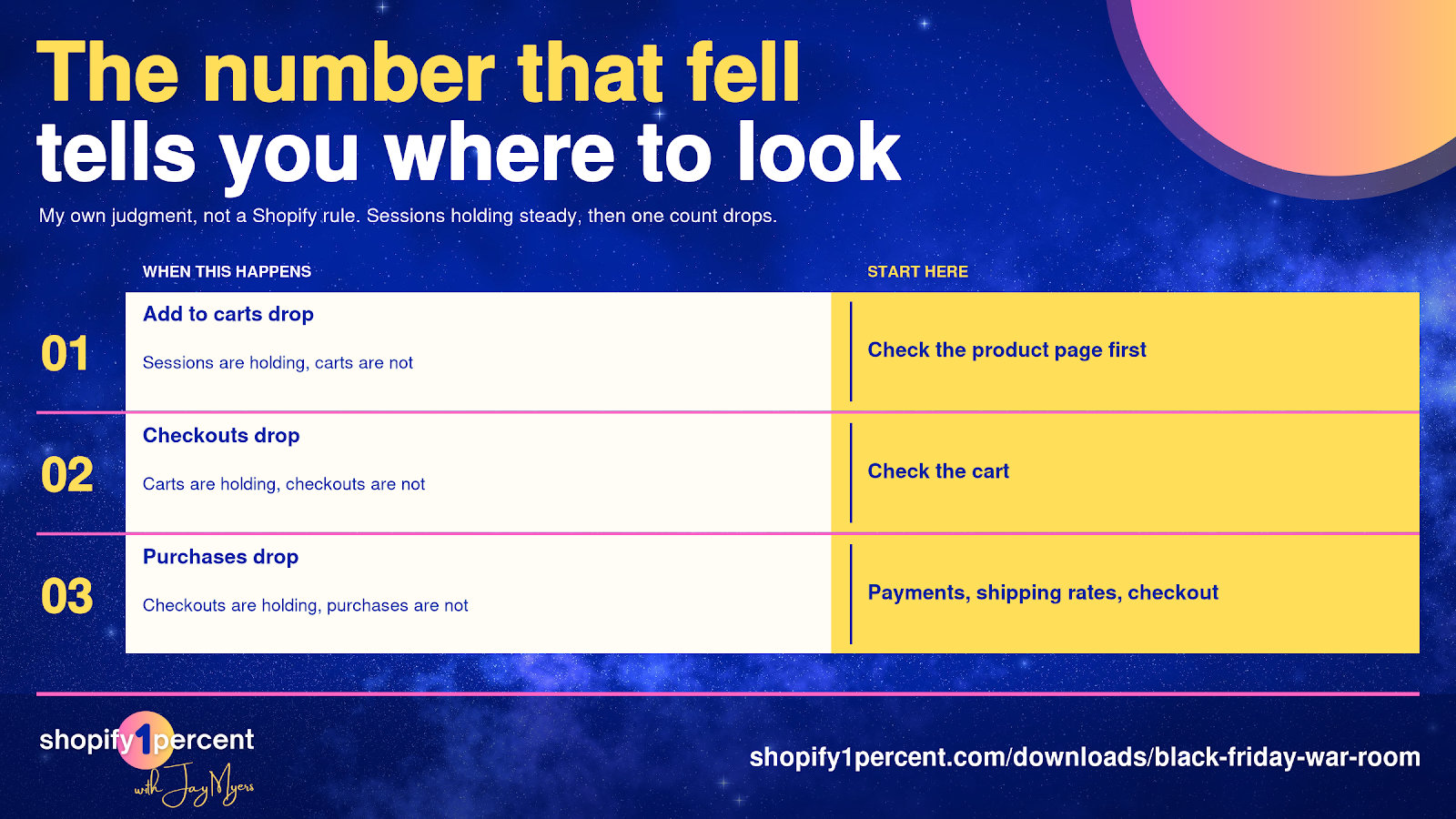
- The number that dropped says where to start: carts point to the product page, checkouts to the cart, and purchases to payments, shipping rates or checkout. Bookmark my.shopifystatus.com, logged in, and stay logged in on a second device in case the admin goes down.
- Place a real test order every morning from Thursday to Monday on a bestseller with the sale discount, then refund it. Automated test flows stop before checkout, so a real order is the only proof the whole checkout works.
It's Black Friday week. Shopify merchants did $14.6 billion in sales over Black Friday Cyber Monday last year, up 27% (Shopify, December 2025). That's a lot of orders, and a lot of traffic that can hide a problem.
Picture this. An app updates overnight and conflicts with another app, and your add to cart button stops working. Sales still come in from people who carted last week and were waiting for the sale. So the number looks a little slow, and nobody panics. That's why I think your sales number is actually the worst alarm you've got.
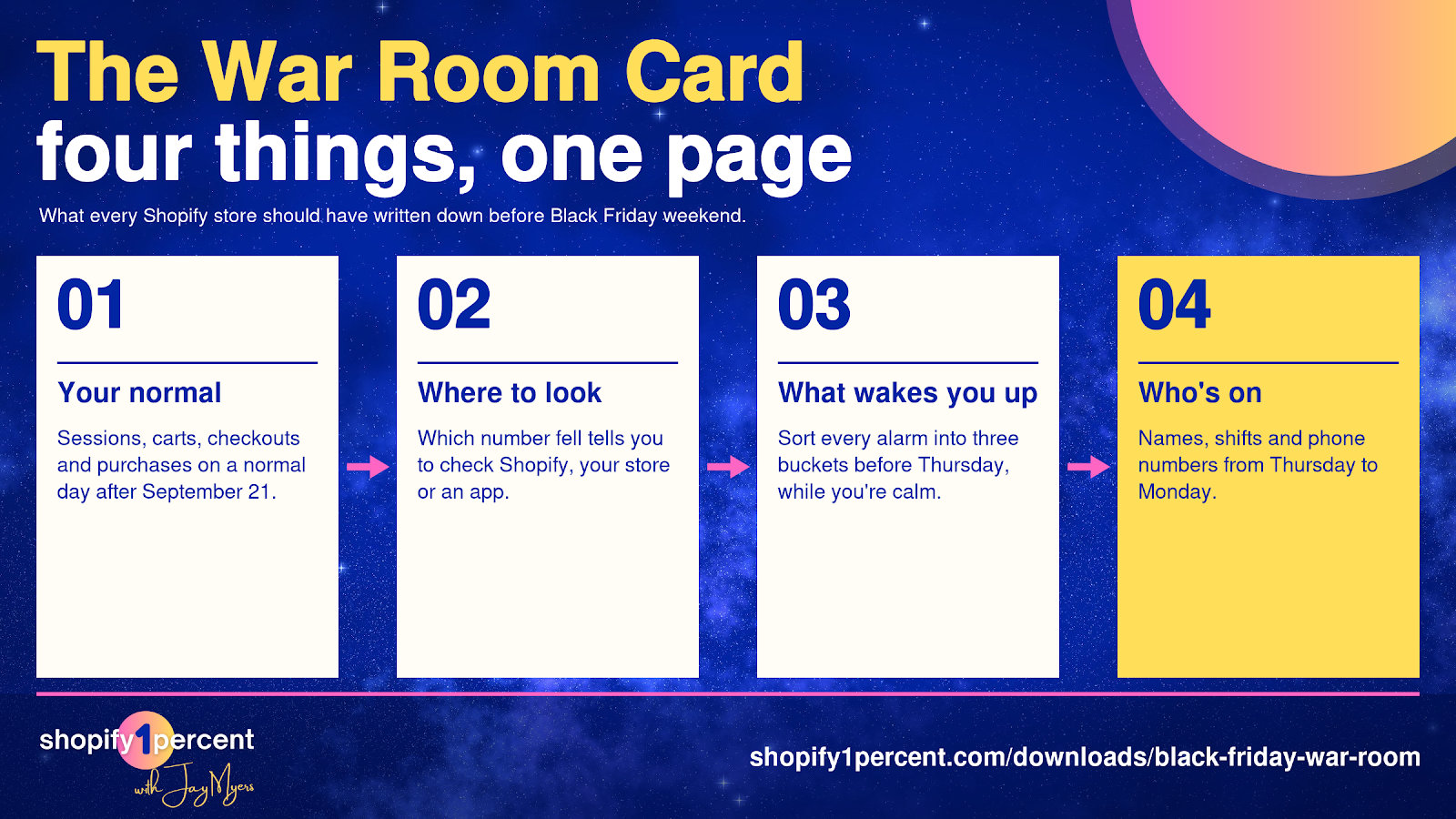
So in this solo episode I walk you through the War Room Card, the one page I'd want beside every computer from Thursday to Monday: your normal, where to look when a number falls, what's worth waking somebody up for, and who's on.
📁 PDF to go with this episode: Download the free War Room Card
📖 Want the full playbook? Read my breakdown: The Black Friday War Room: What to Watch While Orders Roll In
What you'll learn
- Why is your sales number the worst alarm you've got on Black Friday, and which number should you watch first instead?
- Which Shopify report gives you your normal in a couple of minutes, and why does the September 21 session change matter for the day you pick?
- What's my look-now line for add to carts, checkouts and purchases, and what's the first thing to do when one drops?
- Which three things look scary on Black Friday but are usually fine?
- When something's off, how do you tell if it's Shopify, your store, or one of your apps?
- Why is one real test order every morning, Thursday to Monday, the only thing that proves your checkout works?
Chapters
- 00:00:00 Why your sales number is the worst Black Friday alarm
- 00:03:42 The free War Room Card
- 00:04:26 How to find your normal in Shopify
- 00:06:37 Why add to cart is the number to watch first
- 00:09:46 The number that dropped tells you where to look
- 00:12:11 Is it Shopify, your store, or an app?
- 00:17:31 Wednesday night: screenshots and buying-path apps
- 00:20:26 What's worth waking somebody up for
- 00:22:06 Who's on, and your rollback plan
- 00:28:59 The one thing: a real test order every morning
Our partners
Support the amazing partners who make this possible.
🎁 Remember to email AirPods@Shopify1Percent.com and tell me if you install one to win a pair of the new AirPods 5
SATHI
This episode is brought to you by SATHI, the best affiliate platform built for Shopify brands.
70% of influencer-driven revenue isn't showing up in your dashboard. Codes are leaking. Affiliates are ghosting. And you're paying commissions on sales that never should've counted.
SATHI fixes all of it. Built by the incredible team behind SARAL (200+ top brands, $59M in revenue with influencers).
🎁 Our listeners get early access at MySATHI.io for 20% off
Rewind
The undo button for Shopify. I’ve watched merchants lose entire catalogs to one bad import or an app update... Shopify’s own terms make your store data your responsibility. Rewind backs up your products, themes, orders, and customers automatically, and restores one item, or your whole store in a couple of clicks.
In my opinion, if you're actually serious about your Shopify business, you absolutely should have Rewind running on it. There are no excuses not to have it backed up. Rewind is trusted by 25,000+ businesses including Olaplex and Dr. Martens. Set it up once and have peace of mind forever.
🚨 Our listeners get an extra full month of FREE protection and backups: shopify1percent.com/rewind
Omnisend
I personally use Omnisend for email and SMS on every Shopify store I manage, and for this show too! I've tried them all, and it's hands down the best way to run every email and SMS automation and campaign you need, segment to personalize them, and A/B test everything to optimize conversion.
PLUS, you can now connect Omnisend to ChatGPT or Claude and just ask “where can my email and SMS be making more money?” It reads your actual store data and tells you, then builds the campaign for you right from the chat. It even writes in your brand's voice. Fifteen years doing this and it's the closest I've felt to having a full-time marketer sitting beside me. (Plus most merchants report paying about half the price of Klaviyo.)
🚨 Listeners (YOU) get an exclusive 30% OFF 3 MONTHS: shopify1percent.com/omnisend
Resources and links mentioned
- My blog post on this episode: a Shopify Black Friday checklist for the weekend
- The Black Friday War Room Card (free PDF): https://www.shopify1percent.com/downloads/black-friday-war-room/
- Black Friday Backup Plan webinar replay with Dan from Rewind: https://www.shopify1percent.com/live-replay-how-to-bulletproof-your-store-for-black-friday/
- Rewind (30 days free for listeners): https://www.shopify1percent.com/rewind/
- Shopify status page (log in with your Shopify account): https://my.shopifystatus.com/
- Shopify Help Center, Live View: https://help.shopify.com/en/manual/reports-and-analytics/shopify-reports/live-view
- Shopify Changelog, session measurement improvements: https://changelog.shopify.com/posts/shopify-analytics-session-measurement-improvements
- Shopify Flow: https://www.shopify.com/flow
- Baymard Institute, cart abandonment research: https://baymard.com/blog/cart-abandonment-rate
- My episode with Mike Potter of Rewind on Shopify backups: https://www.shopify1percent.com/your-biggest-shopify-data-risk-and-why-your-store-isnt-backed-up-even-on-plus/
Did you know leaving a ⭐️⭐️⭐️⭐️⭐️ review on Spotify, or Apple will give your shop gooood ecommerce karma? ❤️
Frequently Asked Questions
What should I monitor on my Shopify store during Black Friday?
Jay Myers watches three counts against his normal: sessions with cart additions, sessions that reached checkout and sessions that completed checkout. He watches add to carts first, because a broken add to cart button can hide behind orders from shoppers who carted the week before and come back for the sale. That's why Jay calls total sales the worst alarm you've got, and the last number that should tell you something broke.
Where do I find my normal conversion numbers in Shopify?
Jay Myers says to go to Analytics, then Reports, then Conversion rate breakdown, and pick a normal full day. Write down sessions, sessions with cart additions, sessions that reached checkout and sessions that completed checkout. The report already shows each step as a share of all sessions, so there's no math. A store with only a few hundred sessions a day should use a full week instead, so one strange hour doesn't throw it off.
Why do my Shopify add-to-cart and conversion rates look different since September 2026?
Shopify changed how its analytics counts sessions on September 21, 2026, and its changelog says add to cart, reached checkout and conversion rates can all look different from that date on. Jay Myers says to treat it as a new baseline: take your normal from a day after the change, and don't compare this Black Friday's conversion rate with last November's. Orders and sales weren't affected, so last year's sales by hour still compare fine.
What does Shopify Live View show during a sale?
Live View is under Analytics in the Shopify admin and in the same spot in the Shopify app. Its customer behavior section shows active carts, checking out and purchased, all for the last 10 minutes, so Jay Myers compares those with each other. Visitors right now covers the last 5 minutes, so don't divide one by another. If a smaller store usually sees zero to three carts, Jay checks the Conversion rate breakdown for today every few hours instead.
Is the Shopify Live View delay message a problem?
Usually not. Shopify's Help Center says the Live View delay message typically resolves within one to two hours and needs no action. Jay Myers lists it as one of three things that look scary on Black Friday but are fine, along with a conversion rate that looks different from last year and Shopify visitor numbers that don't match Google Analytics. He puts all three in the write it down and go back to bed bucket.
How do I know if a problem is Shopify, my store or an app?
Jay Myers uses the frame his webinar co-host Dan from Rewind gave: keep an eye on your storefront, Shopify's own services like checkout, and the third-party apps you depend on. Bookmark my.shopifystatus.com and log in, then walk your store on your phone like a customer would. The status page's own footer says some issues affecting a small percentage of stores may not show there, so a green page doesn't prove everything works.
What if the Shopify admin goes down on Black Friday?
On Cyber Monday 2025, some merchants couldn't get into the Shopify admin, and it briefly reached point of sale, while Shopify said it kept checkout and storefronts online. Jay Myers says not to panic and to shop the front of your store first. Plan for it anyway, because Live View and every report live inside the admin. Stay logged in on a second device all weekend, print the War Room Card, and walk the store on your phone.
Should I place test orders on Black Friday?
Yes. Jay Myers's one must-do is a real test order every morning from Thursday through Monday, or every six hours for extra protection. Use your phone or desktop, a real credit card, a bestseller and your sale discount, then refund it. Automated test flows stop at the checkout, the status page can miss things and Live View can lag, so Jay says paying for something is the only real proof your checkout works.
00:00 - Why your sales number is the worst Black Friday alarm
03:42 - The free War Room Card
04:26 - How to find your normal in Shopify
06:37 - Why add to cart is the number to watch first
09:46 - The number that dropped tells you where to look
12:11 - Is it Shopify, your store, or an app?
17:31 - Wednesday night: screenshots and buying-path apps
20:26 - What’s worth waking somebody up for
22:06 - Who’s on, and your rollback plan
28:59 - The one thing: a real test order every morning