
Does Shopify Back Up Your Store? What the Terms Say.

Shopify has an official help page called Backups and duplication. I read it start to finish this week, and step ten made me laugh out loud: "Copy and paste your blog posts and online store pages." Step eleven is to rebuild your menus. By hand.
That's the official plan. If you've been quietly assuming somebody at Shopify could roll your store back to yesterday when things go sideways, you're in good company. Most merchants I talk to assume the same thing.
The short answer: Shopify backs up its platform, but it can't restore an individual store. There's no store-wide undo button, a deleted product can't be recovered, and Shopify's terms of service make your products, photos, theme, pages and customer data your responsibility, including when an app you installed changes or deletes them. You can cover part of the gap for free with theme duplicates and CSV exports. Closing the rest takes an automated backup app.
One disclosure before I go further. Rewind, a Shopify backup app, sponsors the podcast. I asked them to, because I was already recommending them to everyone I know. Most of what follows costs nothing.
What does Shopify actually protect?
I think of Shopify as a really good landlord. They keep the building standing, fix the roof, keep the lights on, and put security at the front door. Over Black Friday weekend in 2025 that meant $14.6 billion in sales, peaking at $5.1 million a minute (Shopify, December 2025), and the elevators kept working.
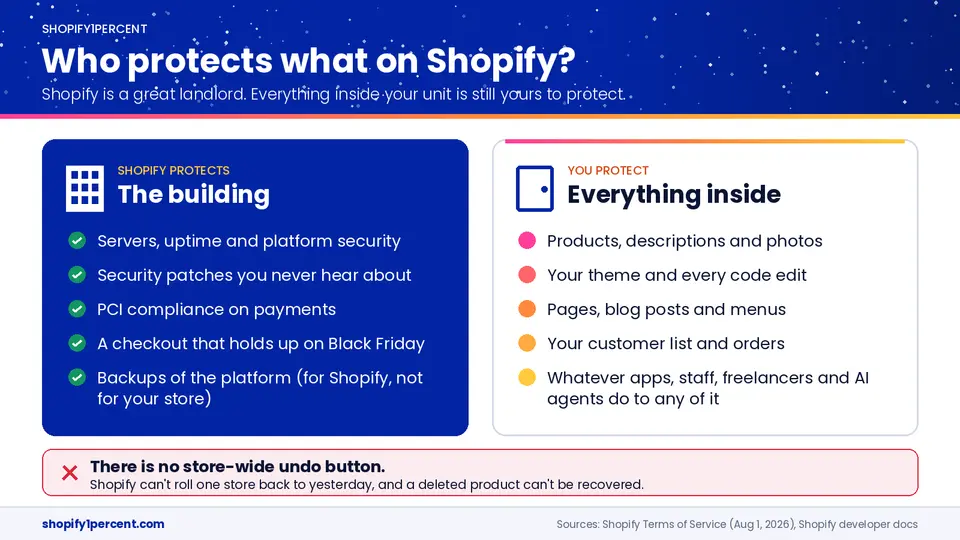
Everything inside your unit is yours, though. Leave the tap running and flood your own kitchen, and the landlord isn't buying you a new couch. It's in the lease.
I think this catches people off guard because every other piece of software in our lives has trained us to expect a safety net. Delete a photo on your phone and it sits in Recently Deleted for 30 days. Delete an email and it's in the trash. Your Shopify admin doesn't have a trash can. Go look.
Shopify's own developer docs say deleting a product can't be undone, and they suggest archiving it. So that's a free 1% win before we're even warmed up. Tell your whole team today: archive, never delete. An archived product comes back in one click. A deleted product comes back with a photographer and a copywriter.
I honestly don't know why Shopify has never built a store-wide rollback. I've never seen an official explanation. My guess is that it's really hard when you've got apps, staff and integrations all writing to the same store at once, because rolling one thing back could break three others. But that's a guess. I moved my first store to Shopify in 2009 and I still don't know the real answer.
What do Shopify's terms of service say about your data?
I read all sixteen sections of Shopify's terms of service, the version dated August 1, 2026. It was a wild night at the Myers house. Three things in there are worth knowing.
First, your stuff is your stuff. Shopify calls it your Materials, and the definition is broad: products, descriptions, prices, photos, videos, code, reviews, and basically any other content or data you put in the store. Shopify writes plain-English summaries beside each section (which I really appreciate), and those summaries say, in so many words, that what you upload stays yours and stays your responsibility. So who owns your Shopify data? You do, and that was never in question. The better question is who's on the hook when it's gone. Also you.
Second, section 7. The list of things Shopify isn't liable for includes loss of data and loss of profits, and the service is provided as is. Before anybody gets mad, nearly every software company has this paragraph. We have one at Bold. Klaviyo's terms go a step further and tell you to keep your own backups. Nobody's hiding any of this. Nobody reads it.
Third, section 9.9, the one about apps. When you install an app, that permissions screen everybody scrolls past is you granting access to your data. And the terms say "Shopify is not responsible for any disclosure, modification or deletion of your data" that results from that access.
Modification or deletion.
I co-founded Bold, and at one point we had 36 apps in the App Store. A lot of them wrote to your products: product options, quantity breaks, memberships, subscriptions, upsells. So I'm saying this as somebody who spent years on the other side of that permissions screen. Most app developers are careful. We were careful. And every app company that's been around long enough has shipped a bug. Reading that clause as a merchant was a little uncomfortable.
Two smaller lines round it out. Section 9.6 says that if a new theme install overwrites your old one, that's on you. And as the store owner you're responsible for everything your staff accounts do. Quick fix while you're thinking about it: in your settings, under users, open each staff account and look at what they can do with products. Most people on your team don't need permission to delete products or run imports. Turn off what they don't use.
What happens when AI or an app deletes your data?
Count the hands on your store. Go to Settings, then Apps and sales channels, and count what's installed. I've seen stores with well over forty. Now add your staff, your agency, your freelancer, and your nephew who "knows Shopify" and still has a login.
And lately, AI. Shopify's 2025 merchant survey found that three-quarters of established businesses already use AI tools (Shopify, 2026). I've had great conversations on the show about AI agents handling Shopify support and about how AI shopping tools read your product data before a shopper ever sees your homepage. I'm a fan. But AI works at machine speed, which means it also makes mistakes at machine speed.
The cleanest example I know isn't even ecommerce. In July 2025, SaaStr founder Jason Lemkin was testing Replit's AI coding agent. During a code freeze, with explicit instructions not to change anything, it wiped a production database holding records on more than 1,200 executives and nearly 1,200 companies (eWeek, July 2025). His post afterward: "It deleted our production database without permission." The data came back because Replit had backups and a restore.
Swap "production database" for "product catalogue" and you've got the Shopify version. The terms are clear about whose problem it is when that happens, and a backup is the only thing that turns it from a rebuild into a restore.
What can you back up in Shopify for free?
More than most people realize, and I don't want anyone walking away thinking the only answer is to buy something. There are four safety nets already sitting in your admin. Each one stops somewhere specific.
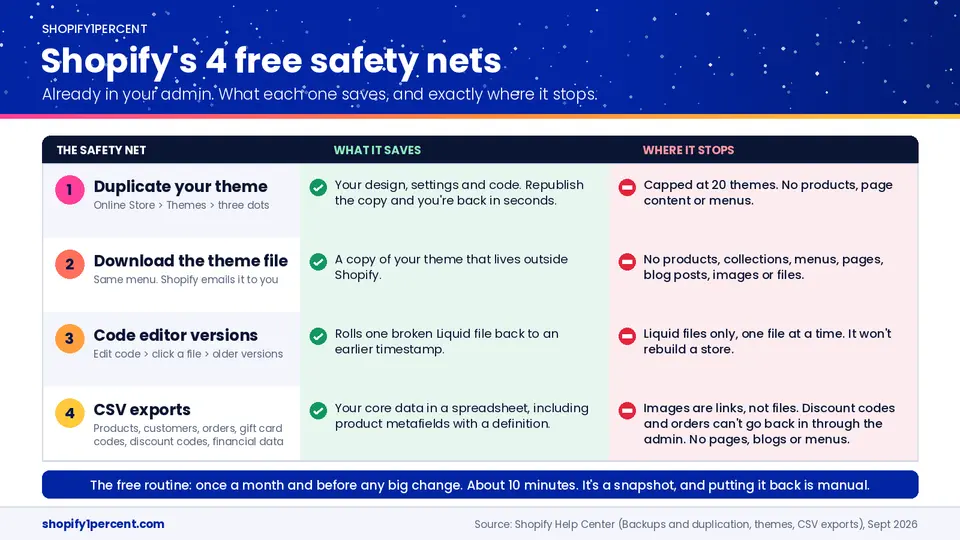
Duplicate your theme before every change. Online Store, Themes, the three dots beside your live theme, Duplicate. Name the copy like a grown-up, with the date in year-month-day order and what you're about to touch: "2026-09-17 new header." I've seen so many stores with a theme called Copy of Copy of Copy of Dawn, which tells you nothing at eleven o'clock at night. When your freelancer breaks the mobile header at four on a Friday, you publish the copy and you're back in ten seconds. Where it stops: you can keep up to 20 themes, and a theme is only the design. No products, no page content, no menus.
Download the theme file from the same menu and Shopify emails it to you, so a copy lives outside Shopify. Where it stops: the download doesn't include products, collections, menus, pages, blog posts, images, or anything in your Files section.
The code editor has a little rewind of its own. If somebody breaks a Liquid file, open Edit code, click the file, and pick an older version from the dropdown under the file name. A lot of merchants have no idea it's there. Where it stops: Liquid files, one at a time. It's a scalpel. It won't put a store back together.
Then CSV exports. Shopify lists six: products, customers, orders, gift card codes, discount codes and financial data. One update, because this changed: if you learned years ago that metafields don't export, that's out of date. Shopify's help centre now says product metafields are included in the product CSV, as long as you've set up a definition for each one. Shopify ships changes constantly (the Spring '26 Edition alone had 150-plus updates), so it's worth rechecking what you think you know.
Where CSVs stop is the part that matters. Your images come out as links, column after column of URLs, and a link to a photo is not the photo. Ask your team today where the original files are for your top twenty products. If the answer is "on the old photographer's laptop," you've found your first problem. And my favourite detail on Shopify's whole help page: you can export your discount codes, but the same page says they can't be transferred back in. Same for gift cards you've already issued. Orders can't be imported through the admin at all. You can do some of it through the API, and it's a headache.
So the free routine looks like this. Once a month, and before any big change, duplicate the theme, download the theme file, export products, customers and orders, and drop it all in a dated folder with your original photos. About ten minutes. Anything that depends on a person remembering eventually stops happening, which is why I'm such a fan of Shopify Flow automations for everything else, so put this one on a calendar. If you're a smaller store and money's tight, do that and you're ahead of most stores I talk to.
Just understand what you've got: a snapshot from the last time you remembered, and putting it back is manual labour.
How do stores actually lose their data?
Almost never the way people imagine. There's a case study in Rewind's library I keep coming back to. It's a vendor case study, so consider the source, but the details are specific enough that I believe it. Whisker Seeker Tackle makes catfishing gear (best company name I've said on the podcast). Five people, and Black Friday is worth about $120,000 to them in one day. Three days before it, they were fighting a CSV import that wouldn't go in. Their ecommerce platform's support team suggested deleting all 300-plus SKUs and re-uploading clean. The re-upload failed. Every product, every SKU, every photo, and the platform had no backup either. The owner, Matt Davis, called it "the biggest nightmare of my life." His team spent 70 hours reshooting photos for more than a hundred SKUs, finished just in time, and still hit their number.
What sticks with me is that there's no villain. Nobody got hacked. Somebody was trying to fix a spreadsheet problem. (The case study doesn't name the platform, and it doesn't need to. The terms read much the same everywhere.)
The version I hear most often isn't one store, it's a pattern. It's a Tuesday afternoon and there's a sale on Thursday. Somebody exports the product CSV to update prices, 1,400 rows because every variant gets its own line. They sort one column to find the expensive stuff and forget to sort the rest with it. Every price slides onto a different product. They import it, and Shopify does exactly what it was told. Now the $140 jacket is $12 and the $12 socks are $140. Guess which one sells out first. Nobody notices for hours, the last clean export is three months old, and at eleven that night three people are fixing 1,400 prices from memory, old screenshots and the accounting software.
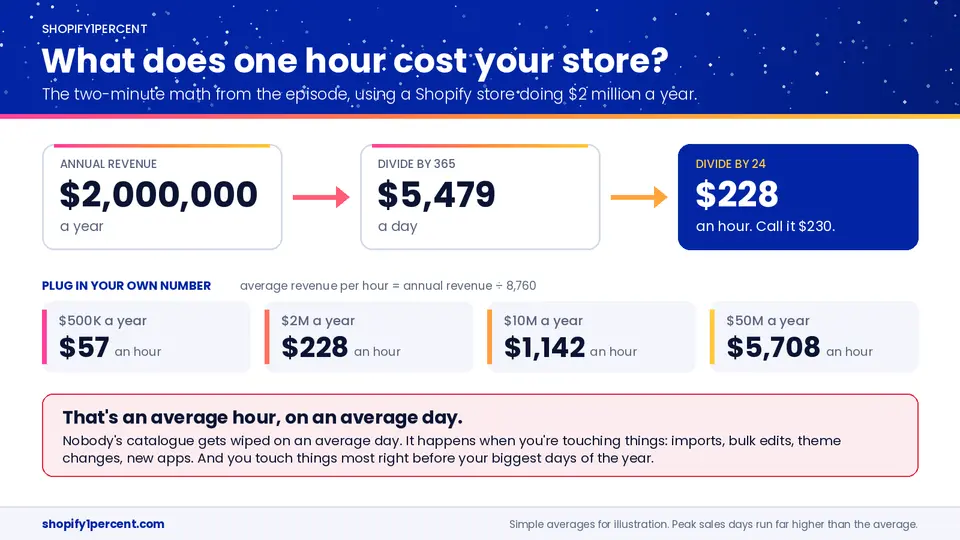
Put your own number on it. A store doing $2 million a year makes roughly $5,500 a day, call it $230 an hour. And that's an average hour on an average day. Nobody's catalogue gets wiped on an average day. It happens when you're touching things, and you touch things most right before your biggest days. More than 94,900 Shopify merchants had their highest-selling day ever over that same BFCM weekend (Shopify, December 2025). I've covered where Shopify stores leak money on the show before. This is the leak nobody budgets for.
Should you pay for a Shopify backup app?
If the store is your actual business, I think so. I couldn't sleep otherwise.
The one I use and recommend is Rewind. It backs up your store automatically every day, and again as changes happen: products, images, metafields, collections, customers, orders, your theme, the content of your pages and blogs, your policies. All the stuff Shopify's help page told you to copy and paste. It keeps a year of history, and you can restore one product, one image or one blog post, or roll the whole store back to a point in time. If you've ever used Time Machine on a Mac to put your computer back the way it was last Wednesday, it's that, for your Shopify store. On that bad Tuesday, you'd pick this morning, restore your products, and go back to getting ready for Thursday.
There's a bigger tier called Protection Suite that adds around-the-clock checkout monitoring, alerts when a big batch of products changes at once, and staging stores for testing off to the side. I'll get into those in later episodes. It starts to make sense once you've got a team or an agency changing things every week, or when one hour of a broken checkout costs more than the plan does.
Whatever tool you look at, Rewind or anyone else, ask it five questions:
- Does it run without me remembering?
- Can I restore one thing without rolling back everything?
- How far back does the history go?
- What does it not back up?
- Have I actually tested a restore?
The fourth matters more than people think. No tool backs up everything, because there are parts of Shopify apps aren't allowed to reach. Ask for the list. A good company will hand it to you.
If you want to try it, podcast listeners get 30 days of automated Shopify backups free through Rewind.
The 1% win: build your Undo Map
Grab a sheet of paper and make three columns. What is it. Where would I restore it from. How long would it take.
Or use this PDF Template we made for you!
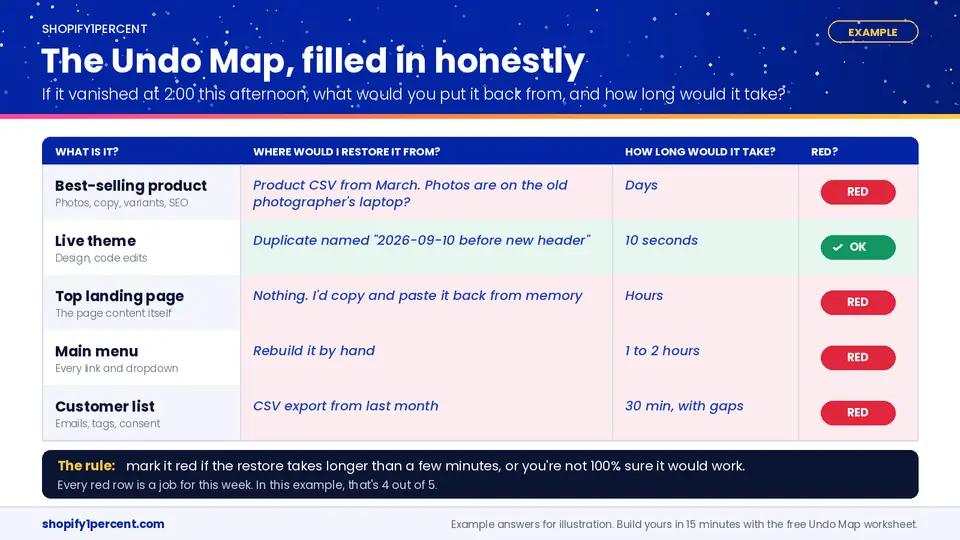
Five rows: your best-selling product (all of it, the photos, description, variants, SEO fields, metafields), your live theme, your highest-traffic landing page, your main menu, and your customer list. If you only get to three today, do three.
Then fill it in, and no cheating. If the answer is "a CSV from three months ago," write that down. If it's "I'd call my developer and hope she kept a copy," write that down. If the restore can't happen within minutes, or you're not completely sure it would work, mark the row red. Every red row is a job for this week.
"From memory" is founder dependency with a nicer name, the same thing that came up when I talked with Lexi Grant about what makes a Shopify business sellable. A store that only comes back if one person remembers how it was built is fragile, whether or not you ever plan to sell it.
Some reds you'll fix for free with the ten-minute routine. Some you'll decide are worth paying to automate. Either way, once you've got a backup of any kind, test it once. Duplicate a product, wreck the copy on purpose, then put it back. A backup you've never restored from is a guess.
I made a one-page Undo Map worksheet with the instructions on it, so you can hand it to whoever on your team has their hands on the product CSV.
The full walkthrough is in the episode, including the settings paths and the part where I try to do division live on a microphone. Search Shopify1Percent wherever you listen to podcasts, and follow the show so the next one in this series finds you.

Co-Founder @ Bold Commerce // Host Shopify1Percent
Jay Myers has been in the ecommerce game for over 25 years. First as a merchant, then a service provider, and today a software provider. His company, Bold Commerce, has helped over 800,000 online stores sell more on Shopify. Their suite of apps help brands maximize LTV (Customer LifeTime Value), and AOV (Average Order Value).
Bold has been ranked one of Canada's Top Medium Sized Employers, ranked in the top 50 fastest growing companies in Canada by Deloitte multiple years, a Top Growing Company in Canada by the Globe and Mail, and winner of the Ernst and Young Entrepreneur of the Year award.

Your Shopify Store Already Has an Influencer List. Go Count It.